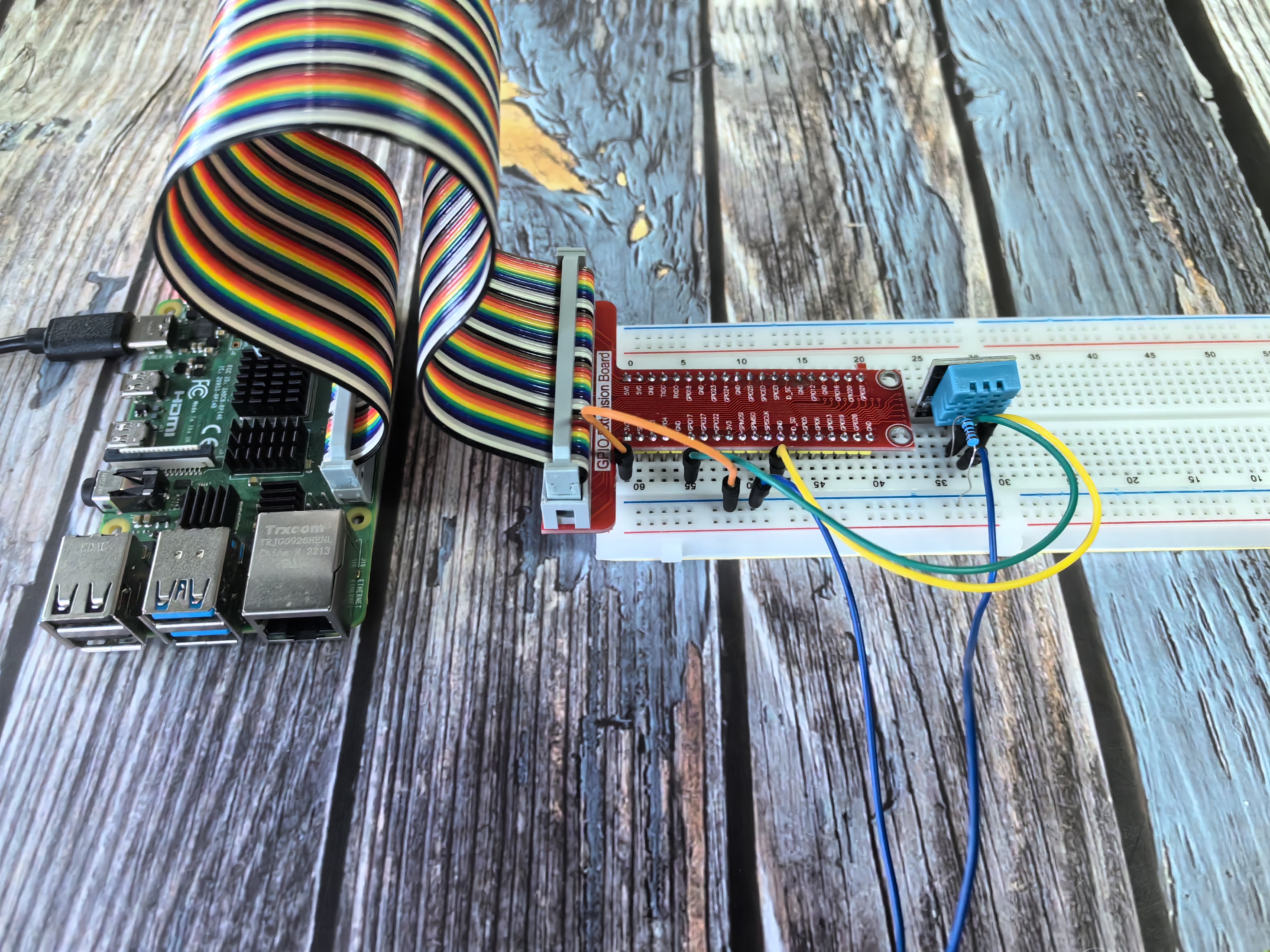
2.2.3 DHT-11
Introduction
In this beginner-friendly project, you’ll learn how to measure both temperature AND humidity using a single smart sensor called the DHT11. Think of it like a weather station in a tiny package - it can tell you how hot it is AND how humid the air feels, just like the weather app on your phone!
Components
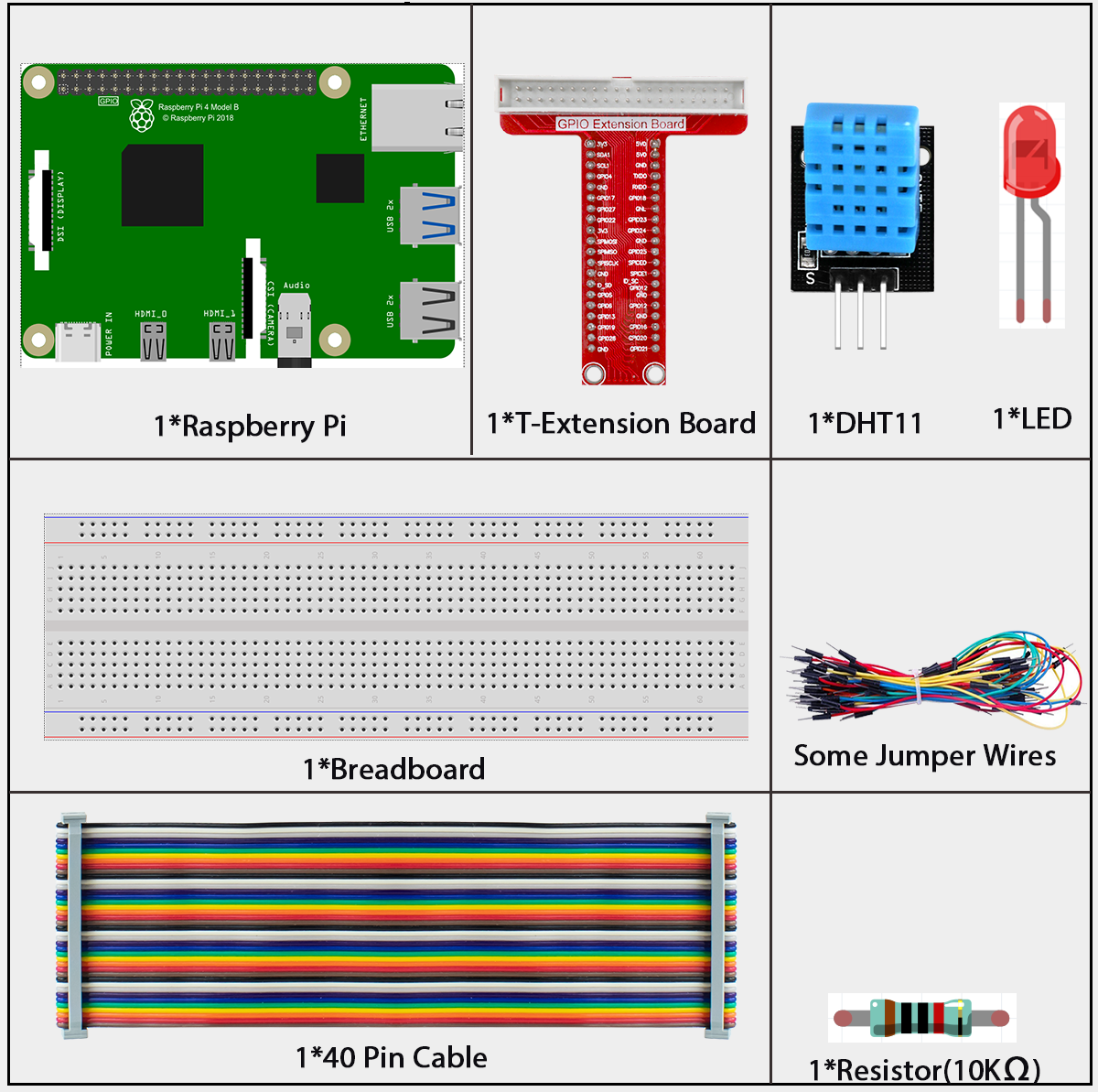
What is a DHT11?
The DHT11 is a digital sensor that measures two things at once: 1. Temperature - How hot or cold the air is 2. Humidity - How much moisture (water vapor) is in the air
Why is this special? Unlike the thermistor we used before (which only measures temperature), the DHT11 gives us both measurements in one small, affordable package!
What’s inside the DHT11? - Humidity sensor: Uses a special material that changes properties when moisture is present - Temperature sensor: Similar to the thermistor we learned about earlier - Smart chip: A tiny computer that processes the readings and sends clean digital data
Key advantages for beginners: - All-in-one: Temperature + humidity in one sensor - Digital output: No complex analog-to-digital conversion needed - Pre-calibrated: Ready to use, no complex setup required - Affordable: Great for learning projects - Simple wiring: Only 3 connections needed
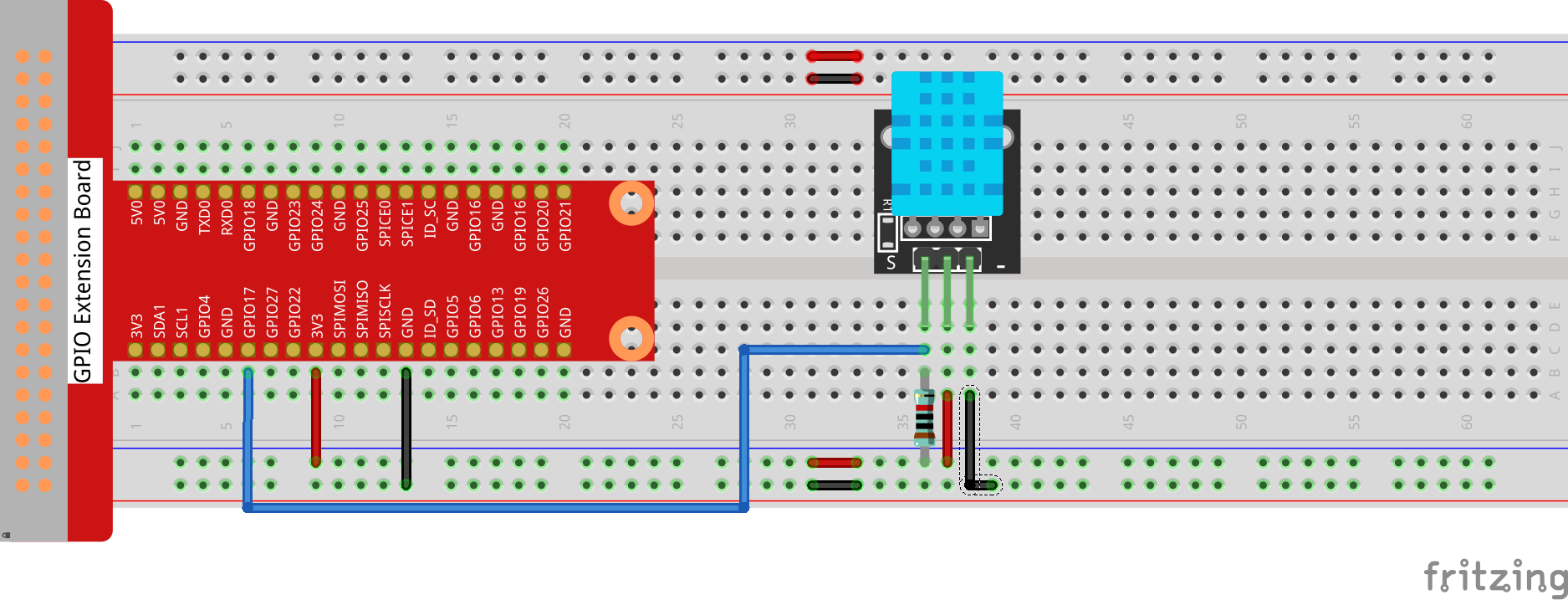
The 3 pins you need: - VCC: Power (connect to 3.3V or 5V) - GND: Ground (connect to ground) - DATA: Communication line (connect to a GPIO pin)
What data do you get? The DHT11 sends you a complete weather report in digital format: - Humidity reading (0-100%) - Temperature reading (0-50°C) - Built-in error checking to make sure the data is accurate
Perfect for projects like: - Home weather station - Plant watering system (plants need specific humidity!) - Comfort monitoring (too dry? too humid?) - Automatic ventilation control
Connect
Code
For C Language User
Go to the code folder compile and run.
cd ~/super-starter-kit-for-raspberry-pi/c/2.2.3/
gcc DHT11.c DHT.c -lwiringPi
sudo ./a.out
After the code runs, the program will print the temperature and humidity detected by DHT11 on the computer screen.
This is the complete code
#include <wiringPi.h>
#include <stdio.h>
#include <stdlib.h>
#include <stdint.h>

#define maxTim 85

#define dhtPin 0

int dht11_dat[5] = {0,0,0,0,0};

void readDht11()
{
   uint8_t laststate = HIGH;
   uint8_t counter = 0;
   uint8_t j = 0, i;
   float Fah; // fahrenheit

   dht11_dat[0] = dht11_dat[1] = dht11_dat[2] = dht11_dat[3] = dht11_dat[4] = 0;

   // pull pin down for 18 milliseconds
   pinMode(dhtPin, OUTPUT);
   digitalWrite(dhtPin, LOW);
   delay(18);
   // then pull it up for 40 microseconds
   digitalWrite(dhtPin, HIGH);
   delayMicroseconds(40);
   // prepare to read the pin
   pinMode(dhtPin, INPUT);

   // detect change and read data
   for ( i=0; i< maxTim; i++) {
      counter = 0;
      while (digitalRead(dhtPin) == laststate) {
         counter++;
         delayMicroseconds(1);
         if (counter == 255) {
            break;
         }
      }
      laststate = digitalRead(dhtPin);

      if (counter == 255) break;

      // ignore first 3 transitions
      if ((i >= 4) && (i%2 == 0)) {
         // shove each bit into the storage bytes
         dht11_dat[j/8] <<= 1;
         if (counter > 50)
            dht11_dat[j/8] |= 1;
         j++;
      }
   }

   // check we read 40 bits (8bit x 5 ) + verify checksum in the last byte
   // print it out if data is good
   if ((j >= 40) &&
         (dht11_dat[4] == ((dht11_dat[0] + dht11_dat[1] + dht11_dat[2] + dht11_dat[3]) & 0xFF)) ) {
      Fah = dht11_dat[2] * 9. / 5. + 32;
      printf("Humidity = %d.%d %% Temperature = %d.%d *C (%.1f *F)\n",
            dht11_dat[0], dht11_dat[1], dht11_dat[2], dht11_dat[3], Fah);
   }
   //else
   //        {
   //        printf("Data not good, skip\n");
   //        }
}

int main (void)
{

   if(wiringPiSetup() == -1){ //when initialize wiring failed, print messageto screen
      printf("setup wiringPi failed !");
      return 1;
   }

   while (1)
   {
      readDht11();
      delay(500); // wait 1sec to refresh
   }

   return 0 ;
}
For Python Language User
Go to the code folder and run.
cd ~/super-starter-kit-for-raspberry-pi/python
python 2.2.3_DHT.py
After the code runs, the program will print the temperature and humidity detected by DHT11 on the computer screen.
#!/usr/bin/env python3
# -*- coding: utf-8 -*-

"""
DHT11 Temperature and Humidity Sensor Demo

This is a robust Python demo for reading the DHT11 sensor using a hybrid
Python + C library approach. The program features an intelligent retry
mechanism and clean output formatting.

Features:
- Hybrid Python + C architecture for optimal performance
- Silent retry mechanism with up to 15 attempts per cycle
- Clean, formatted output with cycle counting
- Robust error handling and user-friendly interface

Hardware Setup:
- Connect DHT11 data pin to BCM GPIO 17 (wiringPi pin 0)

Dependencies:
- dht_driver.py (Python wrapper for C library)
- dht_c_driver.so (Compiled C shared library)
- wiringPi library

Author: LAFVIN
Date: 2025/08/01
"""

import time
from dht_driver import DHT

# --- Configuration ---
DHT11_DATA_PIN = 0  # wiringPi pin number (corresponds to BCM GPIO 17)

def main():
   """The main function of the program."""
   print("Starting DHT11 sensor reading program (Python + C Library)...")
   print("--------------------------------------------------------------")
   print("Press Ctrl+C to exit.")
   print()

   # Initialize the DHT sensor driver
   try:
      dht = DHT()  # This will automatically load the C library and initialize wiringPi
      print("DHT11 driver initialized successfully.")
   except Exception as e:
      print(f"Error initializing DHT11 driver: {e}")
      return

   measurement_cycle = 0

   # --- Main Measurement Loop ---
   while True:
      measurement_cycle += 1
      max_retries = 15

      # --- Silent Retry Loop ---
      # This loop attempts to read the sensor up to 'max_retries' times.
      # It does so silently to provide a clean user experience.
      humidity = None
      temperature = None

      for attempt in range(max_retries):
            humidity, temperature = dht.read(DHT11_DATA_PIN)

            if humidity is not None and temperature is not None:
               break  # Exit loop on first successful read

            # If it failed, wait briefly before retrying.
            time.sleep(0.3)

      # --- Final, Clean Output ---
      # Print the result for this measurement cycle in a clean format.
      print(f"Cycle #{measurement_cycle}: ", end="")
      if humidity is not None and temperature is not None:
            print(f"Humidity = {humidity:.1f}%, Temperature = {temperature:.1f} C")
      else:
            # This message only appears if all retries fail.
            print("Failed to get a valid reading from the sensor.")

      # Wait for 2 seconds before the next major cycle.
      time.sleep(2)


if __name__ == '__main__':
   try:
      main()
   except KeyboardInterrupt:
      print("\nProgram stopped by user.")
   except Exception as e:
      print(f"\nAn unexpected error occurred: {e}")
Phenomenon