3.1.3 Reversing Alarm
Introduction
In this beginner-friendly project, you’ll build your own parking sensor system just like the ones in modern cars! Using an ultrasonic sensor (acts like electronic “eyes”), an LCD display (shows distance), and a buzzer (makes warning beeps), you’ll create a complete reverse assist system. This is perfect for adding to RC cars, robots, or just learning how parking sensors work in real vehicles.
Components

How your parking sensor works:
🔍 Ultrasonic Sensor: Acts as electronic “eyes” that measure the distance to obstacles (walls, objects, etc.)
📺 LCD Display: Shows the exact distance in an easy-to-read format, so you know precisely how far away obstacles are
🔊 Smart Buzzer: Changes its beeping pattern based on distance: - Far away: Slow, quiet beeps (or no sound) - Getting closer: Faster beeps - Very close: Rapid, urgent beeping (Watch out!)
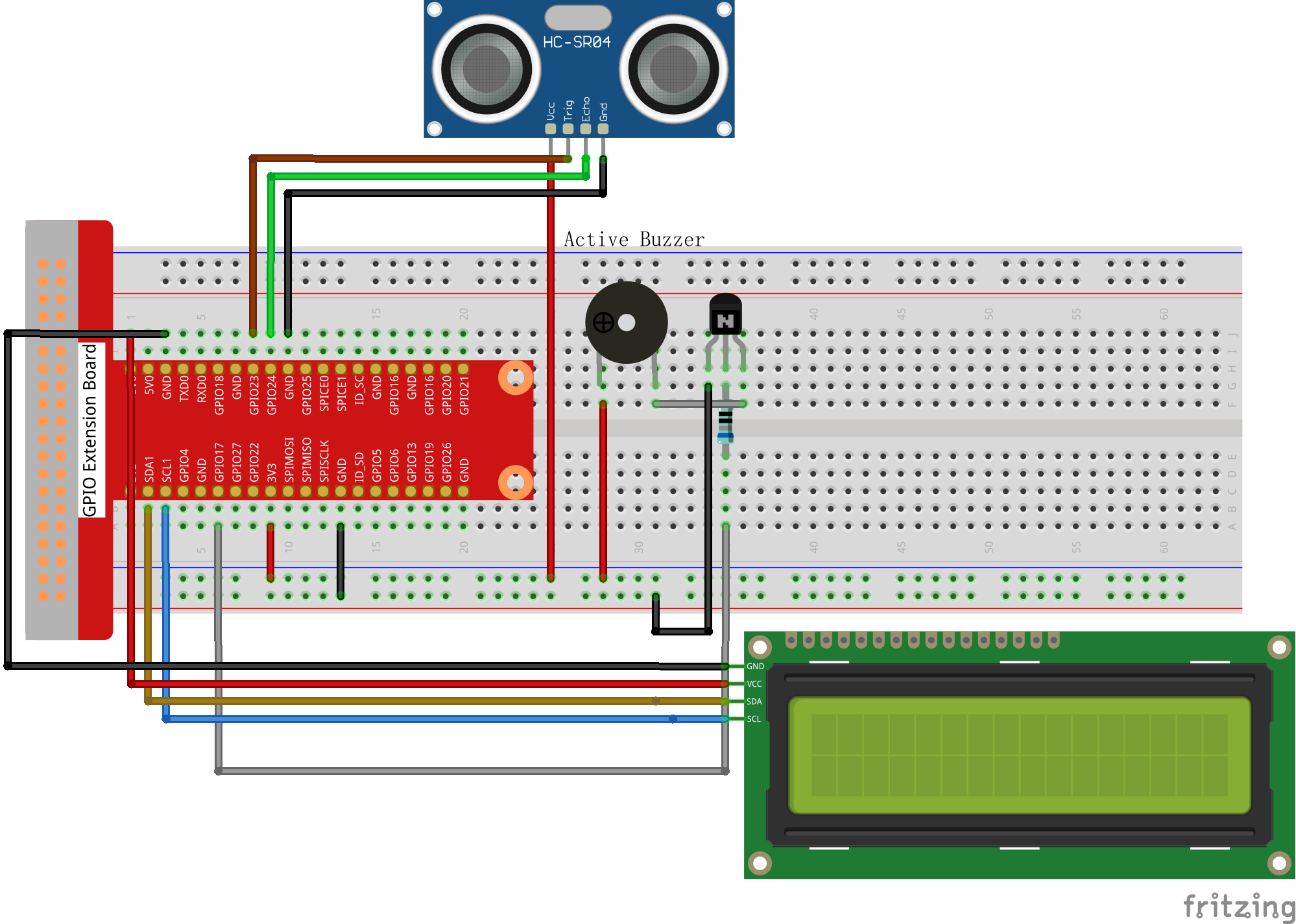
Connect
T-Board Name |
physical |
wiringPi |
BCM |
|---|---|---|---|
GPIO23 |
Pin 16 |
4 |
23 |
GPIO24 |
Pin 18 |
5 |
24 |
GPIO17 |
Pin 11 |
0 |
17 |
SDA1 |
Pin 3 |
||
SCL1 |
Pin 5 |
Code
For C Language User
Go to the code folder compile and run.
cd ~/super-starter-kit-for-raspberry-pi/c/3.1.3/
gcc 3.1.3_ReversingAlarm.c -lwiringPi
sudo ./a.out
How it works in action:
Once your program starts running:
Distance Detection: The ultrasonic sensor continuously measures how far away obstacles are
Visual Feedback: The LCD1602 display shows the exact distance in real-time
Audio Alerts: The buzzer provides audio warnings that change based on how close you are to obstacles
The closer you get to an obstacle, the faster and more urgent the beeping becomes - just like a real car parking sensor!
Warning
Want to study the code? Use nano 3.1.3_ReversingAlarm.c or nano 3.1.3_ReversingAlarm.py to see how distance measurement and audio feedback work together!
For Python Language User
cd ~/super-starter-kit-for-raspberry-pi/python/
sudo python3 3.1.3_ReversingAlarm.py
Phenomenon