1.1.3 LED Dot Matrix
Introduction
An LED dot matrix is an array of LEDs arranged in rows and columns that can display characters, symbols, and patterns when controlled properly.
Components
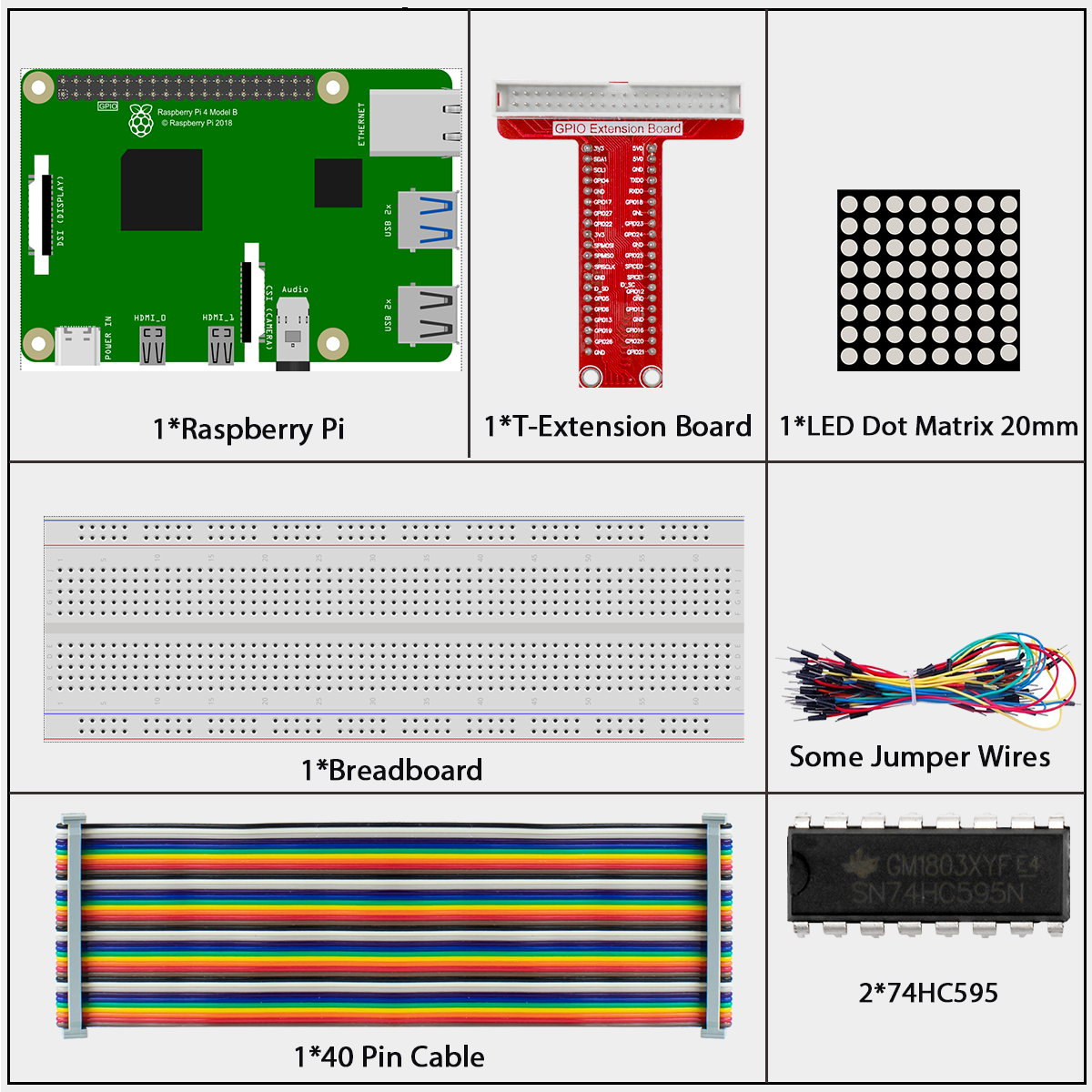
LED Dot Matrix
LED dot matrices come in two main types: common cathode (CC) and common anode (CA). In this kit, we use a CA type (labeled as 788BS).
The matrix has 16 pins arranged at the back - pins 1-8 on one side and pins 9-16 on the other side.
The external view:
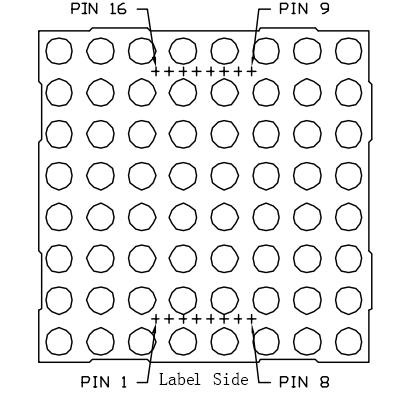
In our common anode (CA) LED matrix: - ROW pins (9, 14, 8, 12, 1, 7, 2, 5) connect to the anodes (+) - COL pins (13, 3, 4, 10, 6, 11, 15, 16) connect to the cathodes (-)
To light an LED at a specific position, you need to set its ROW pin HIGH and its COL pin LOW. For example, to light the top-left LED, set pin 9 (row) HIGH and pin 13 (column) LOW.
Pin numbering corresponding to the rows and columns:
COL |
1 |
2 |
3 |
4 |
5 |
6 |
7 |
8 |
|---|---|---|---|---|---|---|---|---|
Pin No. |
13 |
3 |
4 |
10 |
6 |
11 |
15 |
16 |
ROW |
1 |
2 |
3 |
4 |
5 |
6 |
7 |
8 |
Pin No. |
9 |
14 |
8 |
12 |
1 |
7 |
2 |
5 |
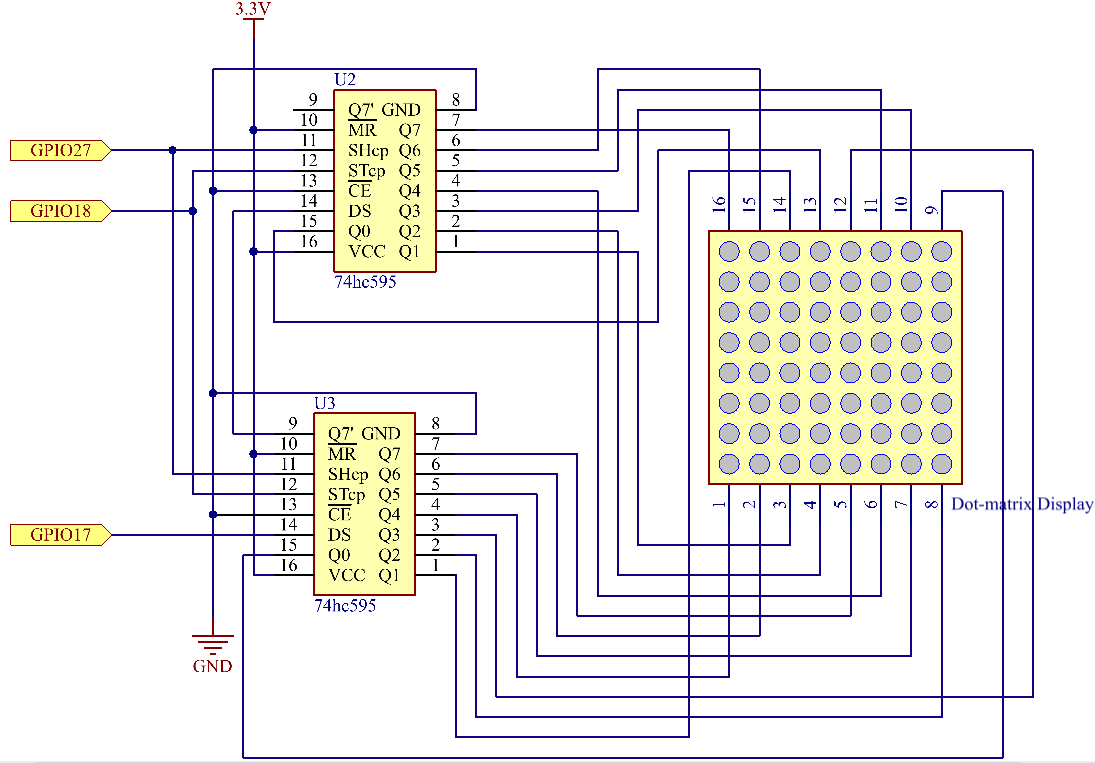
Connect
Note
In the Fritzing image above, the side with label is at the bottom.
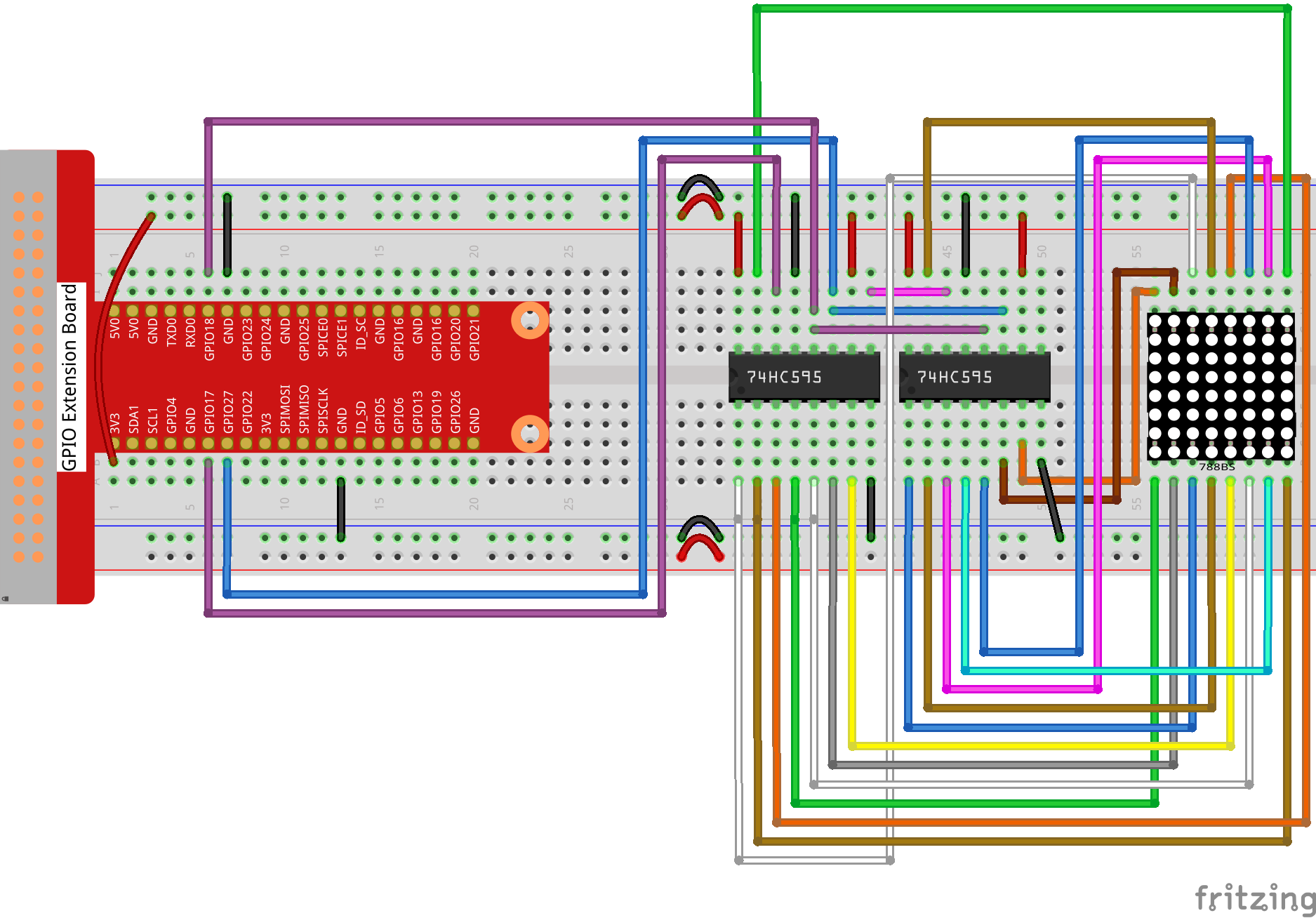
Code
For C Language User
Go to the code folder compile and run.
cd ~/super-starter-kit-for-raspberry-pi/c/1.1.3/
gcc 1.1.3_LedMatrix.c -lwiringPi
sudo ./a.out
After the code runs, the LED dot matrix lights up and out row by row and column by column.
This is the complete code
/*
* LED Matrix Control Program using 74HC595 Shift Register - FINAL VERSION
* This program creates animated patterns on an 8x8 LED matrix
* Hardware: Raspberry Pi + 74HC595 + 8x8 LED Matrix
*/

#include <wiringPi.h>
#include <stdio.h>

// Pin definitions for 74HC595 shift register
#define SDI     0   // Serial Data Input (DS pin on 74HC595)
#define RCLK    1   // Register Clock (ST_CP pin) - latches data to output
#define SRCLK   2   // Shift Register Clock (SH_CP pin) - shifts data

#define DISPLAY_DELAY   100  // Delay between pattern changes (ms)

// Animation pattern data
unsigned char scan_down_high[8] = {0x01, 0x02, 0x04, 0x08, 0x10, 0x20, 0x40, 0x80};
unsigned char scan_down_low[8]  = {0x00, 0x00, 0x00, 0x00, 0x00, 0x00, 0x00, 0x00};

unsigned char scan_right_high[8] = {0xff, 0xff, 0xff, 0xff, 0xff, 0xff, 0xff, 0xff};
unsigned char scan_right_low[8]  = {0x7f, 0xbf, 0xdf, 0xef, 0xf7, 0xfb, 0xfd, 0xfe};

// Arrow patterns
unsigned char arrow_up_high[8] = {0x01, 0x02, 0x04, 0x08, 0x10, 0x20, 0x40, 0x80};
unsigned char arrow_up_low[8]  = {0xe7, 0xc3, 0x81, 0x00, 0xe7, 0xe7, 0xe7, 0xe7};

unsigned char arrow_right_high[8] = {0x01, 0x02, 0x04, 0x08, 0x10, 0x20, 0x40, 0x80};
unsigned char arrow_right_low[8]  = {0xef, 0xcf, 0x8f, 0x00, 0x00, 0x8f, 0xcf, 0xef};

unsigned char arrow_down_high[8] = {0x01, 0x02, 0x04, 0x08, 0x10, 0x20, 0x40, 0x80};
unsigned char arrow_down_low[8]  = {0xe7, 0xe7, 0xe7, 0xe7, 0x00, 0x81, 0xc3, 0xe7};

unsigned char arrow_left_high[8] = {0x01, 0x02, 0x04, 0x08, 0x10, 0x20, 0x40, 0x80};
unsigned char arrow_left_low[8]  = {0xf7, 0xf3, 0xf1, 0x00, 0x00, 0xf1, 0xf3, 0xf7};

void initPins(void) {
      pinMode(SDI, OUTPUT);
      pinMode(RCLK, OUTPUT);
      pinMode(SRCLK, OUTPUT);
      digitalWrite(SDI, LOW);
      digitalWrite(RCLK, LOW);
      digitalWrite(SRCLK, LOW);
}

/*
 * Send one byte of data to the 74HC595 shift register
 */
void shiftOutByte(unsigned char data) {
      for (int bit = 0; bit < 8; bit++) {
              digitalWrite(SDI, (data & 0x80) ? HIGH : LOW);
              data <<= 1;

              digitalWrite(SRCLK, HIGH);
              delayMicroseconds(10);
              digitalWrite(SRCLK, LOW);
      }
}

/*
 * Latch the data from shift register to output pins
 */
void latchOutput(void) {
      digitalWrite(RCLK, HIGH);
      delayMicroseconds(10);
      digitalWrite(RCLK, LOW);
}

/*
 * 🆕 Clear the entire LED matrix display
 * Turns off all LEDs by sending zeros to both shift registers
 */
void clearDisplay(void) {
      shiftOutByte(0x00);  // Clear column data (all columns OFF)
      shiftOutByte(0x00);  // Clear row data (all rows OFF)
      latchOutput();       // Apply the changes
}

void displayPattern(unsigned char low_byte, unsigned char high_byte) {
      shiftOutByte(low_byte);
      shiftOutByte(high_byte);
      latchOutput();
      delay(DISPLAY_DELAY);
}

/*
 * Display a complete 8x8 pattern using row scanning
 */
void displayCompletePattern(unsigned char* row_data, unsigned char* col_data, int duration_ms) {
      unsigned long start_time = millis();

      while ((millis() - start_time) < duration_ms) {
              for (int row = 0; row < 8; row++) {
                      shiftOutByte(col_data[row]);
                      shiftOutByte(row_data[row]);
                      latchOutput();
                      delayMicroseconds(500);

                      if ((millis() - start_time) >= duration_ms) {
                              break;
                      }
              }
      }
}

void playTopToBottomScan(void) {
      printf("Playing: Top-to-bottom scan...\n");
      for (int i = 0; i < 8; i++) {
              displayPattern(scan_down_low[i], scan_down_high[i]);
      }
      delay(200);
}

void playLeftToRightScan(void) {
      printf("Playing: Left-to-right scan...\n");
      for (int i = 0; i < 8; i++) {
              displayPattern(scan_right_low[i], scan_right_high[i]);
      }
      delay(200);
}

/*
 * Stage 3: Arrow animation (clockwise rotation)
 * 🔧 ADDED: Clear display after each arrow and at the end
 */
void playArrowAnimation(void) {
      printf("Playing: Arrow rotation...\n");

      printf("  ↑ UP\n");
      displayCompletePattern(arrow_up_high, arrow_up_low, 1000);
      clearDisplay();  // 🆕 Clear after UP arrow
      delay(100);      // Brief pause to see the clear

      printf("  → RIGHT\n");
      displayCompletePattern(arrow_right_high, arrow_right_low, 1000);
      clearDisplay();  // 🆕 Clear after RIGHT arrow
      delay(100);

      printf("  ↓ DOWN\n");
      displayCompletePattern(arrow_down_high, arrow_down_low, 1000);
      clearDisplay();  // 🆕 Clear after DOWN arrow
      delay(100);

      printf("  ← LEFT\n");
      displayCompletePattern(arrow_left_high, arrow_left_low, 1000);
      clearDisplay();  // 🆕 Clear after LEFT arrow - THIS FIXES THE ISSUE!

      printf("Arrow sequence completed, clearing display...\n");
      delay(500);      // Pause before next cycle
}

int main(void) {
      if (wiringPiSetup() == -1) {
              printf("Error: Failed to initialize wiringPi!\n");
              return 1;
      }

      printf("LED Matrix Animation Started...\n");
      printf("Animation sequence: Top-to-bottom → Left-to-right → Arrow rotation\n");
      printf("Display clears between animations for clean transitions\n");
      printf("Press Ctrl+C to exit\n");

      initPins();

      // 🆕 Clear display at startup
      clearDisplay();
      printf("Display initialized and cleared\n");

      while (1) {
              playTopToBottomScan();
              clearDisplay();        // 🆕 Clear after top-to-bottom scan
              delay(100);

              playLeftToRightScan();
              clearDisplay();        // 🆕 Clear after left-to-right scan
              delay(100);

              playArrowAnimation();  // Already has clear after each arrow

              printf("=== Starting new animation cycle ===\n");
      }

      return 0;
}
For Python Language User
Go to the code folder and run.
cd ~/super-starter-kit-for-raspberry-pi/python
python 1.1.3_LedMatrix.py
This is the complete code
#!/usr/bin/env python3
"""
@brief LED Matrix Control Program using 74HC595 Shift Register - Python Version
@description This program creates animated patterns on an 8x8 LED matrix
            Hardware: Raspberry Pi + 74HC595 + 8x8 LED Matrix
"""

import RPi.GPIO as GPIO
import time
import signal
import sys
from threading import Event

# ========== PIN CONFIGURATION ==========
# Pin definitions for 74HC595 shift register (BCM numbering)
SDI_PIN = 17        # Serial Data Input (DS pin on 74HC595)
RCLK_PIN = 18       # Register Clock (ST_CP pin) - latches data to output
SRCLK_PIN = 27      # Shift Register Clock (SH_CP pin) - shifts data

# ========== TIMING CONFIGURATION ==========
DISPLAY_DELAY = 0.1     # Delay between pattern changes (seconds)
ARROW_DURATION = 1.0    # Duration for each arrow display (seconds)
STAGE_PAUSE = 0.2       # Pause between animation stages (seconds)
CLEAR_PAUSE = 0.1       # Pause after clearing display (seconds)

# ========== ANIMATION PATTERN DATA ==========
# Stage 1: Top-to-bottom scanning (8 frames)
scan_down_high = [0x01, 0x02, 0x04, 0x08, 0x10, 0x20, 0x40, 0x80]
scan_down_low  = [0x00, 0x00, 0x00, 0x00, 0x00, 0x00, 0x00, 0x00]

# Stage 2: Left-to-right scanning (8 frames)
scan_right_high = [0xff, 0xff, 0xff, 0xff, 0xff, 0xff, 0xff, 0xff]
scan_right_low  = [0x7f, 0xbf, 0xdf, 0xef, 0xf7, 0xfb, 0xfd, 0xfe]

# Stage 3: Arrow patterns (4 directions)
# Row selection data (same for all arrows)
arrow_row_select = [0x01, 0x02, 0x04, 0x08, 0x10, 0x20, 0x40, 0x80]

# Column data for different arrow directions
arrow_up_cols    = [0xe7, 0xc3, 0x81, 0x00, 0xe7, 0xe7, 0xe7, 0xe7]  # Arrow pointing UP ↑
arrow_right_cols = [0xef, 0xcf, 0x8f, 0x00, 0x00, 0x8f, 0xcf, 0xef]  # Arrow pointing RIGHT →
arrow_down_cols  = [0xe7, 0xe7, 0xe7, 0xe7, 0x00, 0x81, 0xc3, 0xe7]  # Arrow pointing DOWN ↓
arrow_left_cols  = [0xf7, 0xf3, 0xf1, 0x00, 0x00, 0xf1, 0xf3, 0xf7]  # Arrow pointing LEFT ←

# ========== GLOBAL VARIABLES ==========
program_running = Event()
program_running.set()

class LEDMatrixController:
   """Class to control 8x8 LED Matrix using 74HC595 shift register"""

   def __init__(self):
      """Initialize the LED Matrix controller"""
      self.setup_exit_handler()
      self.initialize_gpio()

   def setup_exit_handler(self):
      """Setup signal handler for graceful exit"""
      signal.signal(signal.SIGINT, self.handle_program_exit)
      print("🛡️  Press Ctrl+C to safely exit")

   def handle_program_exit(self, signum, frame):
      """Handle program exit (Ctrl+C)"""
      print("\n🛑 Ctrl+C pressed! Shutting down...")

      # Clear the display
      self.clear_display()
      print("📺 Display cleared")
      print("👋 LED Matrix Animation terminated!")

      program_running.clear()
      GPIO.cleanup()
      sys.exit(0)

   def initialize_gpio(self):
      """Initialize all GPIO pins"""
      print("🔧 Initializing LED Matrix System...")

      try:
            # Set GPIO mode to BCM numbering
            GPIO.setmode(GPIO.BCM)
            GPIO.setwarnings(False)

            # Configure shift register control pins as outputs
            GPIO.setup(SDI_PIN, GPIO.OUT)      # Data line to shift register
            GPIO.setup(RCLK_PIN, GPIO.OUT)     # Latch pin to update display
            GPIO.setup(SRCLK_PIN, GPIO.OUT)    # Clock pin for shifting data

            # Initialize all pins to LOW
            GPIO.output(SDI_PIN, GPIO.LOW)
            GPIO.output(RCLK_PIN, GPIO.LOW)
            GPIO.output(SRCLK_PIN, GPIO.LOW)

            print("✅ GPIO pins configured and initialized")
            print("🚀 Hardware initialization complete!\n")

      except Exception as e:
            print(f"❌ ERROR: Failed to initialize GPIO: {e}")
            sys.exit(1)

   def shift_out_byte(self, data):
      """
      Send one byte of data to the 74HC595 shift register
      Data is sent MSB first (bit 7 to bit 0)

      Args:
            data (int): The 8-bit value to send (0-255)
      """
      for bit in range(8):
            # Extract the MSB and send it to SDI pin
            bit_value = (data & 0x80) != 0
            GPIO.output(SDI_PIN, bit_value)
            data <<= 1  # Shift left for next bit

            # Pulse the shift clock to move data into register
            GPIO.output(SRCLK_PIN, GPIO.HIGH)
            time.sleep(0.00001)  # 10 microseconds delay
            GPIO.output(SRCLK_PIN, GPIO.LOW)

   def latch_output(self):
      """
      Latch the data from shift register to output pins
      This makes the data visible on the LED matrix
      """
      GPIO.output(RCLK_PIN, GPIO.HIGH)
      time.sleep(0.00001)  # 10 microseconds delay
      GPIO.output(RCLK_PIN, GPIO.LOW)

   def clear_display(self):
      """
      Clear the entire LED matrix display
      Turns off all LEDs by sending zeros to both shift registers
      """
      self.shift_out_byte(0x00)  # Clear column data (all columns OFF)
      self.shift_out_byte(0x00)  # Clear row data (all rows OFF)
      self.latch_output()        # Apply the changes

   def display_pattern(self, low_byte, high_byte):
      """
      Display one frame of the LED matrix pattern

      Args:
            low_byte (int): Column data (0-255)
            high_byte (int): Row selection data (0-255)
      """
      self.shift_out_byte(low_byte)   # Send low byte first
      self.shift_out_byte(high_byte)  # Send high byte second
      self.latch_output()             # Update the display
      time.sleep(DISPLAY_DELAY)       # Hold the pattern

   def display_complete_pattern(self, row_data, col_data, duration_seconds):
      """
      Display a complete 8x8 pattern using row scanning (multiplexing)

      Args:
            row_data (list): List of 8 bytes for row selection
            col_data (list): List of 8 bytes for column patterns
            duration_seconds (float): How long to display the pattern
      """
      start_time = time.time()

      while (time.time() - start_time) < duration_seconds:
            if not program_running.is_set():
               break

            # One complete scan of all 8 rows
            for row in range(8):
               self.shift_out_byte(col_data[row])
               self.shift_out_byte(row_data[row])
               self.latch_output()
               time.sleep(0.0005)  # 0.5ms per row

               # Check if time is up during scanning
               if (time.time() - start_time) >= duration_seconds:
                  break

   def play_top_to_bottom_scan(self):
      """
      Stage 1: Top-to-bottom scanning animation
      Lights up one row at a time from top to bottom
      """
      print("🔽 Playing: Top-to-bottom scan...")
      for i in range(8):
            if not program_running.is_set():
               break
            self.display_pattern(scan_down_low[i], scan_down_high[i])
      time.sleep(STAGE_PAUSE)

   def play_left_to_right_scan(self):
      """
      Stage 2: Left-to-right scanning animation
      Lights up one column at a time from left to right
      """
      print("➡️  Playing: Left-to-right scan...")
      for i in range(8):
            if not program_running.is_set():
               break
            self.display_pattern(scan_right_low[i], scan_right_high[i])
      time.sleep(STAGE_PAUSE)

   def play_arrow_animation(self):
      """
      Stage 3: Arrow animation (clockwise rotation)
      Shows arrows pointing up → right → down → left
      """
      print("🏹 Playing: Arrow rotation...")

      arrows = [
            ("↑ UP", arrow_up_cols),
            ("→ RIGHT", arrow_right_cols),
            ("↓ DOWN", arrow_down_cols),
            ("← LEFT", arrow_left_cols)
      ]

      for direction, col_data in arrows:
            if not program_running.is_set():
               break

            print(f"  {direction}")
            self.display_complete_pattern(arrow_row_select, col_data, ARROW_DURATION)
            self.clear_display()  # Clear after each arrow
            time.sleep(CLEAR_PAUSE)

      print("🏹 Arrow sequence completed, clearing display...")
      time.sleep(0.5)  # Pause before next cycle

   def run_animation_loop(self):
      """Main animation loop"""
      print("🚀 Starting LED Matrix Animation...")
      print("📺 Animation sequence: Top-to-bottom → Left-to-right → Arrow rotation")
      print("✨ Display clears between animations for clean transitions")
      print("💡 Press Ctrl+C to exit\n")

      # Clear display at startup
      self.clear_display()
      print("📺 Display initialized and cleared\n")

      cycle_count = 0

      while program_running.is_set():
            try:
               cycle_count += 1
               print(f"🔄 === Animation Cycle {cycle_count} ===")

               # Stage 1: Top-to-bottom scanning
               self.play_top_to_bottom_scan()
               self.clear_display()
               time.sleep(CLEAR_PAUSE)

               # Stage 2: Left-to-right scanning
               self.play_left_to_right_scan()
               self.clear_display()
               time.sleep(CLEAR_PAUSE)

               # Stage 3: Arrow animations
               self.play_arrow_animation()

               print(f"✅ Cycle {cycle_count} completed\n")

            except KeyboardInterrupt:
               break
            except Exception as e:
               print(f"❌ Error in animation loop: {e}")
               time.sleep(0.1)

   def display_startup_info(self):
      """Display startup information"""
      print("=" * 50)
      print("🎮 LED Matrix Animation System - Python Version")
      print("=" * 50)
      print("📝 This program creates animated patterns on an 8x8 LED matrix")
      print("⚡ Uses 74HC595 shift register for multiplexing")
      print("🐍 Python version with RPi.GPIO library")
      print(f"📍 SDI pin: {SDI_PIN} (BCM)")
      print(f"📍 RCLK pin: {RCLK_PIN} (BCM)")
      print(f"📍 SRCLK pin: {SRCLK_PIN} (BCM)")
      print(f"⏱️  Arrow duration: {ARROW_DURATION}s each")
      print(f"⏱️  Display delay: {DISPLAY_DELAY}s")
      print()

def test_display_patterns():
   """Test function to verify display is working correctly"""
   print("🧪 Testing LED Matrix Display...")
   controller = LEDMatrixController()

   # Test simple patterns
   test_patterns = [
      (0x00, 0x01, "Single row"),
      (0xff, 0x01, "Full row"),
      (0x81, 0xff, "Two columns"),
      (0x00, 0x00, "All off")
   ]

   for low, high, description in test_patterns:
      print(f"📺 Testing: {description}")
      controller.display_pattern(low, high)
      time.sleep(1)

   controller.clear_display()
   print("✅ Display test complete!")

def main():
   """Main function - Program entry point"""
   try:
      # Create and run the LED matrix controller
      controller = LEDMatrixController()
      controller.display_startup_info()
      controller.run_animation_loop()

   except KeyboardInterrupt:
      print("\n🛑 Program interrupted")
   except Exception as e:
      print(f"❌ Fatal error: {e}")
   finally:
      GPIO.cleanup()
      print("🧹 GPIO cleanup complete")

if __name__ == "__main__":
   # 🧪 Uncomment the next line to run display test instead of main program
   # test_display_patterns()

   main()
Phenomenon